

Step 2
Set up Supabase
Create PostgreSQL and private S3-compatible attachment storage without exposing Supabase keys to the browser.
Supabase is a convenient foundation because one project can provide both PostgreSQL and S3-compatible storage. Coop does not use Supabase Auth or the browser Data API.
1. Create the project
Create a Supabase project in the region closest to the API host. Save the database password in your secret manager. Disable Enable Data API and Automatically expose new tables because Coop connects through PostgreSQL and does not use Supabase’s browser Data API. Wait until the project reports healthy before copying connection strings.
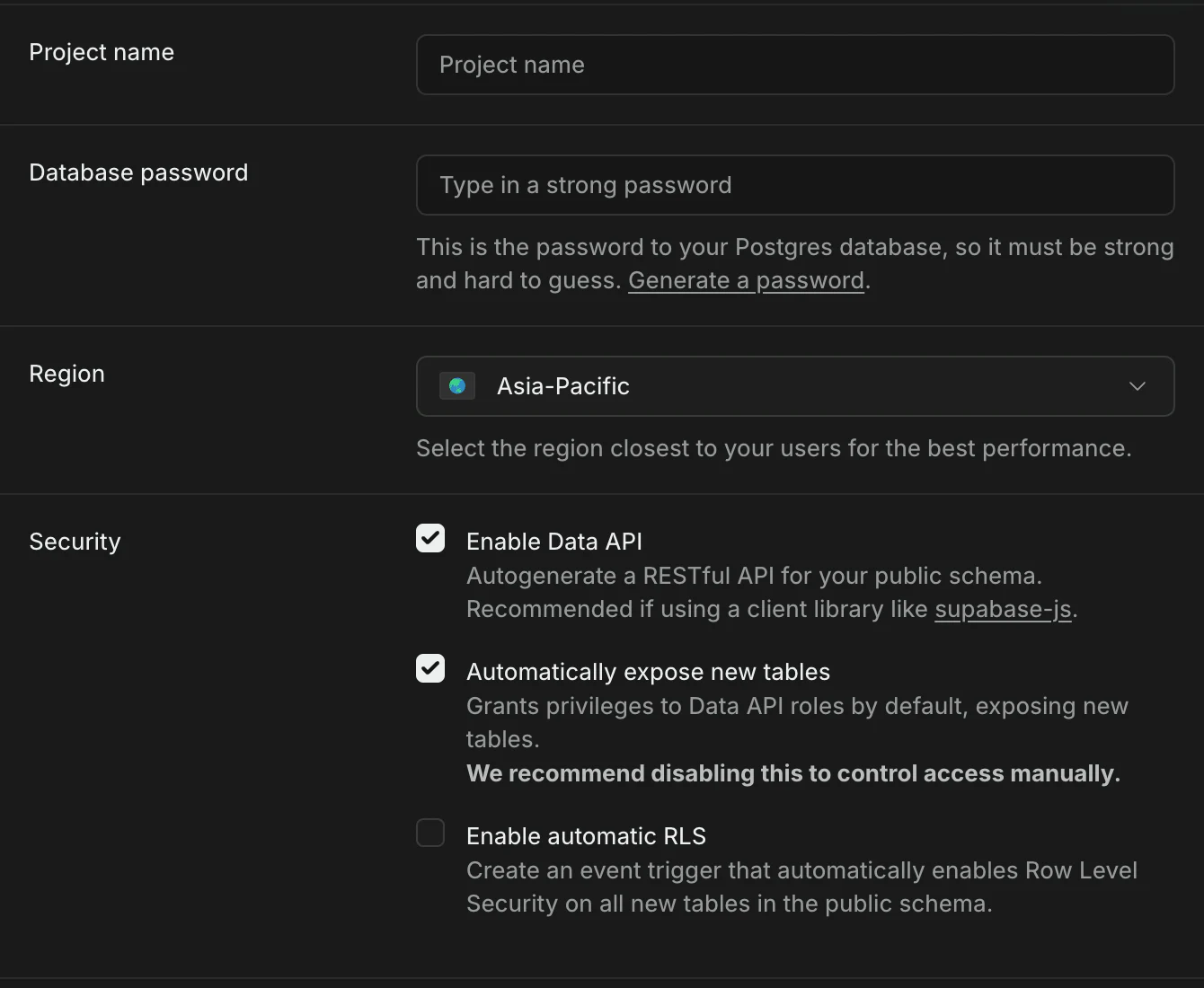
2. Copy two database URLs
Open Connect in the Supabase dashboard. Copy the exact host and username shown there. Do not construct the pooler hostname from the region.
Use a transaction-pooler URL for the running API when your host has many transient connections:
DATABASE_URL=postgresql://postgres.<project-ref>:<password>@<pooler-host>:6543/postgres?sslmode=require&default_query_exec_mode=simple_protocol
Use the session-pooler URL, or a reachable direct URL, for migrations:
MIGRATION_DATABASE_URL=postgresql://postgres.<project-ref>:<password>@<pooler-host>:5432/postgres?sslmode=require
The separation matters. Transaction mode does not support prepared statements, and Coop migrations use a session-scoped advisory lock. A migration through the transaction pooler can lose that lock.
If the password contains &, #, ?, a space, or another reserved URL character, percent-encode it before placing it in either URL.
3. Create private attachment storage
Open Storage and create a bucket named coop-media. Keep it private. The API creates object keys, but it does not create the bucket.
Open the S3 configuration page and generate server-side S3 access keys. These credentials bypass Storage RLS and have broad bucket access, so store them only on the API service.
Set:
MEDIA_S3_ENDPOINT=https://<project-ref>.storage.supabase.co/storage/v1/s3
MEDIA_S3_BUCKET=coop-media
MEDIA_S3_REGION=<region shown by Supabase>
MEDIA_S3_ACCESS_KEY_ID=<generated access key>
MEDIA_S3_SECRET_ACCESS_KEY=<generated secret key>
MEDIA_S3_ADDRESSING_STYLE=path
Do not use the database password, browser publishable key, or Supabase service-role key as S3 credentials.
4. Record backup ownership
Confirm which plan provides the retention your company needs. Record who can restore the database and who can recover the Coop encryption key. Supabase database backups do not replace object-storage backup or encryption-key recovery.
Official references: Supabase database connections and S3 access keys.